


Easiest Guide: Delete Your Facebook Account In 5 Steps

Ready to delete your Facebook account? If not, you may want to at least temporarily deactivate it.
The company has a history of data breaches, leading some to seek to protect their information before the next hack…
Facebook has become this century’s version of the White Pages. Friends and family members use it to stay connected.
Business owners use it to promote their companies. Old colleagues use it to network and people are even using it to buy and sell their items.
As people create and share content all over the world, Facebook has become an enormous source of personal information.
Its business model is to monetize that data by offering hyper-personalized targeted advertising.
In the process, Facebook has had privacy scandals that exposed users’ information in a variety of ways.
One of the biggest, the Facebook Cambridge Analytica scandal was disclosed by a whistleblower who revealed that a political firm was compiling user data via a loophole.
That resulted in up to 87 million users having their personal data accessed. Facebook didn’t notify any of them.
In April 2019 it was uncovered that Facebook was storing millions of users’ passwords in plain text files.
Later that year in July 2019, the Federal Trade Commission announced a $5 billion settlement with Facebook over violations of user privacy.
Most recently, the word is Facebook is threatening a lawsuit against Apple over its upcoming system update that gives users the power to opt-out of data tracking.
That’s a big problem for Facebook, as the company collects data by tracking behavior on its app and others to improve its advertising targeting options.
One takeaway from this history of data abuse and breaches is that it is likely to happen again.
For those who want to protect their privacy and protect themselves against future data breaches and possible identity theft, the best action is to delete your Facebook account.
Whatever your reason for wanting to delete Facebook is, follow these steps. For a complete digital detox, you may want to delete yourself from social media. Some mental peace is worth it!

Click Me To Skip To The Guide!
Why Delete Facebook?
Things can be tricky with Facebook when it comes to deleting your social media account.
It seems like the company is asking its users “ARE YOU REALLLLLLY SURE?” at every step of the way. Facebook has two processes users can take, “Deactivating” and “Deleting” your account.
Although deactivation may seem permanent with some other services, it is a temporary deactivation with Facebook that will pause your account. You can reactivate at any time.
During your deactivation, other users won’t be seen or find your timeline or find your name in any search while it is deactivated. Also: All direct messages sent via Messenger will remain in the inboxes of recipients!
If you want to truly and permanently delete your Facebook account, keep in mind that Facebook has a 30-day backstop in their system. It seems like this was put into place for users who quickly regret their almost-permanent decision.
If you log back into your Facebook account in the month after your request to delete Facebook, Facebook will restore your account and everything attached to it automatically.
If you decide to delete your Facebook account permanently, you can download a copy of their history of information including photos and posts before deleting.
Don’t forget to do this, otherwise you will lose everything that you have posted or shared!
How To Deactivate Your Facebook Account
If you are looking to simply deactivate your account, follow these steps for a temporary solution.
You will be able to continue using Facebook Messenger while your account is deactivated and you will still be able to use your login for other apps like Spotify, Instagram or Pinterest that use your Facebook user info.
To deactivate your Facebook account:
- Click the down arrow in the top right of Facebook.
- Select Settings & Privacy, then click Settings.
- Click Your Facebook Information in the left column.
- Click Deactivation and Deletion.
- Choose Deactivate Account, then click Continue to Account Deactivation and follow the instructions to confirm.
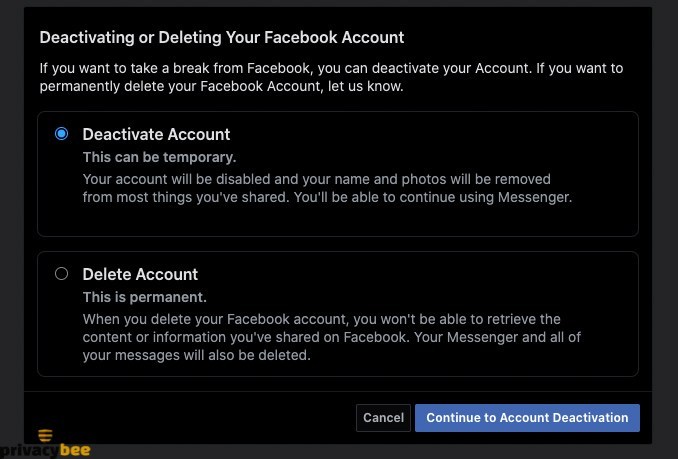
How to delete your Facebook account:
If you are ready to take the leap into the Facebook-less world, follow these steps. Note, you won’t be able to reactive your account. All of your photos, posts and videos will be permanently deleted and you won’t be able to use Facebook Messenger or use Facebook Login for other apps.
To delete your Facebook account forever:
- Click the down arrow in the top right of Facebook.
- Select Settings & Privacy, then click Settings.
- Click Your Facebook Information in the left column.
- Click Deactivation and Deletion.
- Choose Permanently Delete Account, then click Continue to Account Deletion.
Click Delete Account, enter your password and then click Continue.

What’s next?
Privacy is a growing concern in the world, and cleaning up social media accounts is a great first step to reducing your risk and taking back control of your data.
After you’re done deleting Facebook and all of your other social media, take the next steps to protect yourself by removing your name from search engines and later learn how to delete yourself from the internet.
This will reduce your exposure to data breaches and possible identity theft.
A final step you can take to further reduce your risk is to address data broker sites. Follow these steps on how to remove yourself from data broker sites to further reduce your risk — something you absolutely must do if your data has been hacked or stolen.

