

Privacy 101
Joining a gym or club? Protect your personal information first
August 28, 2026

Joining a gym or club? Protect your personal information first
Joining a gym or club usually means filling out a membership form, signing a waiver, and possibly creating an online account. Along the way, you may be asked for more personal information than you expected.
Before you sign up, take a few minutes to see what information is being requested and which parts you actually need to provide. This can help you avoid sharing more than necessary while still giving the gym or club what it needs to provide its services.
Look at the information they ask for
A gym may need basic information such as your name and contact details to set up your membership. Depending on the club, you may also be asked for your address, date of birth, emergency contact, or other information.
Some forms may also ask for your Social Security number (SSN). If you are uncomfortable providing it, ask why it is needed and whether another identifier would work instead. You can also ask whether they only need the last four digits.
Not every field on a membership form serves the same purpose. Information needed to create your membership or complete a waiver may be different from optional information used for marketing, referrals, member profiles, or directories.
The Federal Trade Commission recommends that businesses collect only the personal information they need and keep it only as long as necessary. Read the FTC guidance on protecting personal information.
Take a few minutes to read the waiver
Membership agreements and waivers can be long, which makes it tempting to scroll to the bottom and sign.
Before you do, look for the sections that explain how your personal information is handled. Pay attention to information about what is collected, how it is used, whether it is shared with other companies, and how long it is kept.
You may also see separate terms covering marketing, mobile apps, photos, videos, or member directories.
You do not have to understand every legal term. Focus on the parts that affect your personal information and membership.
Be careful about sharing health information
Some gyms and fitness studios ask about injuries, medical conditions, fitness goals, or physical limitations. There may be a practical reason for collecting some of this information, especially if you are working with a trainer.
Still, check whether the question is required or optional. If you are asked for more detail than seems necessary, you can ask how the information will be used and who will have access to it.
The FTC provides guidance for businesses regarding consumer health information and privacy. Read the FTC consumer privacy guidance.
Check photo ID and biometric requirements
Some gyms or clubs may ask to scan a photo ID during registration. Others may use fingerprints or facial recognition for entry.
If a gym wants to scan or store your ID, find out why it needs the information and how the copy will be protected. You can also ask how long the information will be kept and who can access it.
The same applies to biometric information. If a club uses your fingerprint or face for access, ask what happens to that information after you stop being a member.
There may also be another way to enter, such as a key fob or membership card. If you would rather not use biometric access, ask whether an alternative is available.
Think before adding an emergency contact
An emergency contact can be useful if the gym needs to reach someone quickly. However, you are also sharing another person's information.
Before adding a friend or family member, make sure they are comfortable with you providing their details. Check what information the gym actually requires. If it only asks for a name and phone number, there may be no reason to provide an additional home address.
The same applies to forms that ask for information about other family members. Provide the information that is needed and avoid adding extra details just because there is a space for them.
Check what the gym's app can access
Many gyms use apps for checking in, booking classes, making payments, or tracking workouts.
Before giving an app access to your phone's features, check the permissions it requests. Depending on the app, this could include your location, camera, contacts, or notifications.
Some permissions may be needed for particular features. Others may not be necessary for how you plan to use the app.
You can usually review or change app permissions through your phone's settings. It is also worth checking the app's privacy information so you know how your information is collected and used.
Check what other members can see
Some gyms and clubs offer member profiles or directories. These may show information such as your name, photo, interests, or other profile details.
Before completing your profile, check whether other members can see it and whether you can change the visibility settings.
If the directory is optional, you can choose not to participate. You should also think about what you post yourself. There may be no reason to share your regular workout schedule or other details about when and where you usually exercise.
You do not have to fill every box
Not every question on a membership form is necessarily required.
Marketing preferences, referral information, profile details, and member directory listings may be optional. If a field is optional and you do not see a reason to provide the information, you can leave it blank.
Information needed to process your membership, manage payments, or complete a required waiver may be different. If you are unsure whether something is required, check the form or ask the gym before submitting it.
Use a unique password for your account
If the gym requires you to create an online account, use a password that you do not use for your email or other important accounts.
Your account may contain contact information, bookings, payment details, or other personal information. Using the same password across multiple accounts can put more than one account at risk if the password is exposed.
If the gym offers multi-factor authentication, consider enabling it.
The FTC recommends using strong passwords and multi-factor authentication when available. Read how to create strong passwords and other ways to protect your accounts.
Review the marketing options
During registration, you may be asked whether you want promotional emails, text messages, or newsletters.
If these options are optional and you do not want the messages, you can leave them unchecked. You can also look for an unsubscribe option or communication preferences if you change your mind later.
Your email address or phone number may be necessary for managing your membership. That does not automatically mean you need to receive promotional messages.
Ask what happens when you cancel
Before joining, check what the gym says about your information after your membership ends. Some information may need to be retained for business or legal reasons. Other information may no longer be needed.
The FTC recommends that businesses securely dispose of personal information when they no longer have a legitimate business need for it. Read the FTC guidance on protecting personal information.
For additional steps, see what to do with your data after canceling a subscription.
Check if your information is already exposed
Being careful when joining a gym is a good start, but some of your personal information may already be available online.
Your name, address, phone number, and email address may be collected or published by Data Brokers and People Search Sites.
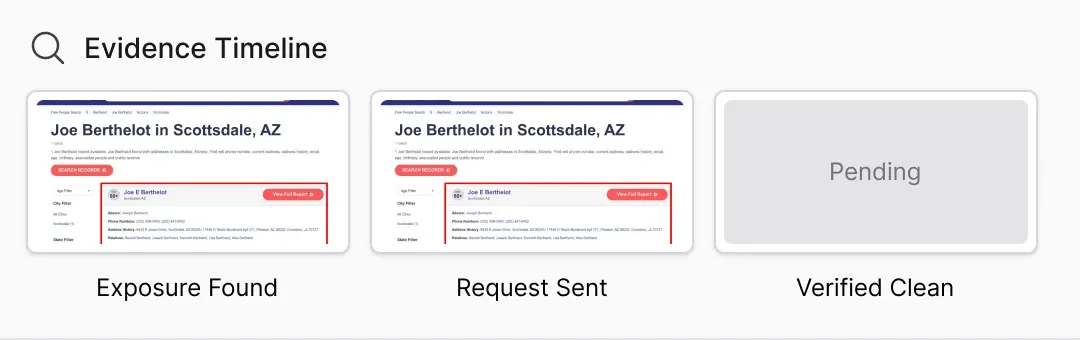
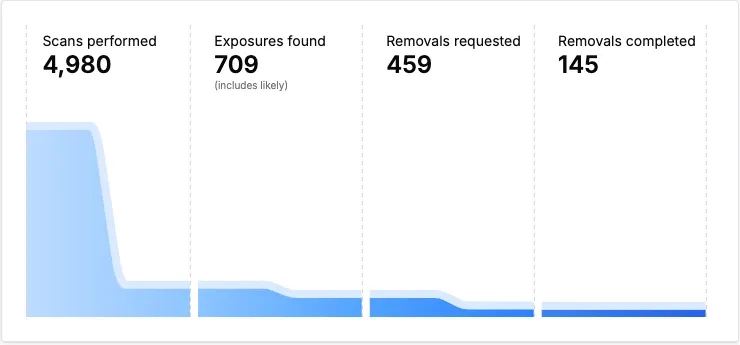
Privacy Bee can help identify exposure across covered sources and submit removal requests to Data Brokers and People Search Sites. You can check what Privacy Bee can remove to learn more about the types of sources covered.
If you find an exposure that Privacy Bee has not identified, you can also submit a Custom Removal Request. Providing the direct URL to the page where your information appears can help the team locate it.
Removal times can vary. Some Data Brokers may take longer to respond, and information can appear again later. Privacy Bee continues monitoring and working on removal requests over time.
A quick privacy check before signing up
Before you finish your gym or club registration, run through this checklist:
Do I know which information is required for my membership?
Did I ask why an SSN or other sensitive information is needed?
Did I check whether the gym accepts another identifier or only the last four digits?
Did I check how photo IDs are stored and how long they are kept?
If biometrics are required, is there a key fob or other alternative?
Did I check whether my emergency contact is comfortable sharing their information?
Did I review the gym's app permissions?
Can other members see my profile or directory information?
Did I review the marketing options?
Am I using a unique password for my account?
Do I know what happens to my information after I cancel?
You do not need to become a privacy expert before joining a gym. A quick review of the information you are being asked to provide can help you make more informed choices.
Frequently asked questions
Do I have to give my SSN to join a gym?
Not necessarily. It depends on the gym or club and why it is requesting the information. If an SSN is requested, ask why it is needed and whether another identifier or only the last four digits will work.
If the gym says the SSN is required, you can ask how it will be used, who can access it, and how long it will be retained.
Can I keep my information out of the gym's member directory?
If the directory is optional, you may be able to choose not to participate. Check the membership form or account settings to see whether there is an opt-out option.
If you are unsure, ask the gym whether your profile will be visible to other members and what information will be displayed.
Protect your information beyond the gym
Joining a gym or club does not have to mean giving out more personal information than necessary.
Before signing up, review the forms, check which fields are optional, and pay attention to how your information will be used. It is also worth checking what information about you is already available through Data Brokers and People Search Sites.
Privacy Bee can help monitor your exposure and submit removal requests for covered sources. The goal is to reduce exposure and continue monitoring your information over time. Want to see where your personal information may be exposed? Run your free Privacy Bee exposure scan